
För att alltid ge dig en tydlig överblick över din turnering är det första som möter dig i Cup Managers lottningsfunktion en översiktsbild över alla dina åldersklasser. I den kan du enkelt få en överblick där du ser alla grupper, slutspel och övergångar mellan dem. Du ser också om det finns lag som inte är med i lottningen än, eller som väntar i en reservlista.
Läs mer i vår manual för att få lite mer exempel på detaljerna i översikten.
Du kan såklart själva skapa varje grupp i hela din lottning manuellt och placera ut lagen själv, men Cup Manager har också en guide som hjälper dig att utnyttja Cup Managers alla automatiska lottingsfunktioner. Välj om du vill ha resultat eller inte i klassen, vilka gruppstorlekar du föredrar och vilka lag som går till slutspel, så generar Cup Manager en lottning till dig automatiskt. Vill du sen göra manuella justeringar i någon klass går det såklart bra! Läs vår manual till lottningsguiden här.
Är du intresserad kan du läsa mer om vad Cup Manager tar hänsyn till i vår informationstext till turneringsnördar.
För att inte låsa dig vid exakt det antal lag som anmält sig till cupen när du genomför en lottning har Cup Manager ett koncept vi kallar för gömda matcher. Det innebär att du i lottningen kan skapa plats för lag som inte finns (eller dragit sig ur turneringen). De matcher som laget som inte finns skulle spelat, både i gruppspelet och i eventuella slutspel, göms då för era besökare. Däremot syns de fortfarande för er administratörer så att ni kan välja att schemalägga dem och tillsätta domare redan innan laget anmält sig, eller medan ni väntar på att ett ersättningslag dyker upp.
Läs mer om gömda matcher i vår manual.
Cup Manager har stöd för att du i dina slutspelsträd (eller kvargrupper) istället för att ta lagen från fast grupper, rangordnar t.ex. alla grupp 3:or för att låta de bästa gå vidare till A-slutspel. På så vis kan du se till att alltid ha ett A-slutspel som går jämnt upp. Givetvis räknas ordningen ut helt automatiskt när du under turneringen lägger in resultat i gruppspelet.
Cup Manager har inga begränsningar när det gäller antalet lag, grupper , slutspel, stadier, klasser, platser, matcher när du skapar ditt schema. Vissa kombinationer kan givetvis vara omständiga, men vi stödjer det ändå. Räkna med att vi intresserat frågar hur ni tänkt om ni gör saker på ett speciellt sätt. Kanske är det värt att ta efter!
Det är självklart så att lag från samma klubb inte ska hamna i samma grupp och tvingas spela mot varandra, men Cup Manager tar det flera steg längre genom att i sin algoritm för att dela ut lag också tar hänsyn till:
- Stad
- Distrikt
- Postkod
- Land
- Landsregion
- Tröjfärg
Det gör att du kommer få balanserade grupper oavsett vilket geografiskt område din turnering täcker. Om du är intresserad beskriver vi mer i detalj hur det går till i vår sida med information till turneringsnördar.
Cup Manager använder sig inte av mallar för att konstruera slutspelträden i en turnering utan av en avancerad algoritm som bygger ett optimalt slutspelsträd oavsett förutsättningarna. Det gör att du inte behöver oroa dig för att manuellt ändra i dina slutspelsträd om du har en komplicerad samling av lag som t.ex. gått vidare till ert B-slutspel eller om ni har många ojämna slutspelsträd.
Har ni kvalgrupper kommer Cup Manager automatiskt se till att lag från samma grupp i det ursprungliga gruppspelet möts så sent som möjligt i slutspelsträden.
Läs mer på vår sida till turneringsnördar om du är intresserad av hur det går till.
För att enkelt få en överblick av hur lag från olika länder eller städer delats ut mellan de olika grupperna i din lottning kan du välja att färglägga lagen efter olika egenskaper.
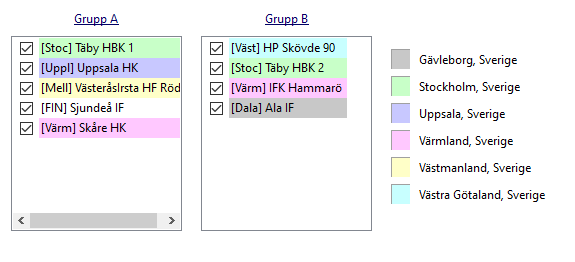
Du kan t.ex. färglägga efter:
- Land
- Kommun
- Landskap
men också saker av annan betydelse, t.ex:
- Ankomstdag
- Möts i slutspel (visar lag från samma klubb som har möjlighet att mötas tidigt i slutspelet)
Om du har en mer komplicerad struktur på din lottning som inkluderar kvalgrupper och fler slutspel, kan Cup Manager automatisk hjälpa dig båda skapa kvalgrupper och slutspel som automatisk ser till att lag från samma grupp i gruppspelet möts så sent i slutspelen som möjligt, även om vägen går via kvalgrupper. Inget mer manuellt pysslande helt enkelt.
Cup Manager har avancerat stöd för resultatlösa klasser som går utöver att resultaten döljs på er hemsida. Vi förespråkar två olika upplägg på en turnering med yngre åldersklasser utan resultat.
Om man har tid för det (t.ex. om man spelar över två dagar), kan man bygga upp två gruppspel efter varandra där man i det andra gruppspelet samlar lag som är ungefär lika bra. Genom att samla in resultat i det första gruppspelet kan Cup Manger sortera lagen till det andra gruppspelet automatisk utan att man manuellt behöver göra en ny lottning inför turnerings andra dag. Det gör också att Cup Manager redan från turneringens start kan visa vilka matcher ett lag potentiellt kommer spela andra dagen för att underlätta planeringen för de deltagande lagen. För att undvika att lag från samma klubb råkar hamna i samma grupp dag 2, kan man använda en utav Cup Managers färgläggningar som varnar om det finns en risk att det händer.
Alternativ 2 är att man samlar alla sina lag i en klass i samma grupp och låter Cup Manager välja ut vilka matcher som ska spelas mellan lagen. Genom att ta hänsyn till varifrån lagen kommer kan Cup Manager välja ut matcher mellan lag som är så olika som möjligt för att ska ett så spännande schema som möjligt. Detta underlättar så klart också om man har lite för få lag för att skapa riktigt grupper, men ändå vill låta alla spela lika många matcher. T.ex. med bara 7 lag, men alla ska spela 5 matcher.
Om ni har för få lag i någon åldersklass kan ni när ni lottar välja att slå samman lagen från två klasser till en klass i lottningen. Sammanslagningen kommer bara påverkar lottningen och inte anmälan av lagen. Det gör både att det är enkelt att ångra, men också att ni kan låta anmälan vara öppen till båda klasserna även efter sammanslagningen ifall det dyker upp några fler lag så att ni kan dela upp klasserna igen.
När man lottar en åldersklass har man hela tiden koll på status för klassens reservlistor och inte godkända anmälningar direkt i lottningsgränssnittet. Det gör att man enkelt kan flytta in lag från reservlistan om det skulle uppstå en lucka någonstans i lottningen.

Precis som i lottning tror vi att det är viktigt med en tydlig översikt även över turneringens schema. Därför kan man alltid få upp hela turneringens spelprogram i ett grafiskt schema med alla matcher. Här kan man enkelt få information om varje enskild match, men också enkelt se varningar och fel i schemat med hjälp av de stödlinjer som visas.
Vill du kan du gruppera dina planer och få ett schema med varje grupp av planer. Cup Manager erbjuder automatiskt grupper per geografiskt område eller storlek på spelplanen (t.ex. 7-manna och 11-manna) i fotboll, men man kan skapa grupper själv om man vill. T.ex. med alla planer där det spelas finaler, eller uppdelat per helg om man spelar flera helger.
Håller man muspekaren över en match får man direkt en inforuta med matchens detaljer, men man kan också klicka och t.ex. få reda på var hemmalag och bortalag spelar alla sina matcher. I slutspel ser man så klart kopplingar till tidigare och nästa match i slutspelet.
Cup Manager har en inbyggd automatisk schemaläggningsfunktion. Är du mer intresserad av hur den fungerar under huven finns det lite mer information här. Den automatiska schemaläggningen tar själv hänsyn till vilotider, ankomsttider och öppettider på era spelplatser, men förutom det finns det en uppsjö av regler man kan lägga till för att få till det schema ni vill ha i turneringen. Spelar ni t.ex. över flera dagar? Ska alla få en minst en match på er fina huvudarena? Vill ni ha ett schema med så lite vila som möjligt för alla lag? Kanske ska en vila vara längre för att de ska hinna äta ett snacks från er kiosk?
Även med en automatisk funktion för både lottning och schemaläggning finns det massvis med frågor att ta ställning till. Vi tror att ett system inte blir bra förrän man också har en bra support. Därför uppmanar vi alla våra kunder att boka en workshop med våra duktiga medarbetare där de får möjlighet att visa tips, tricks och alla smarta funktioner som just ni med era förutsättnigar har nytta av! Här finns också en manual med de vanligaste inställningarna.
Cup Manager tar automatiskt hänsyn till den ankomstinformation som lagen lagt till i sin anmälan om ni låtit dem göra det. Både i det grafisk schemat som visar varningar om första matchen är innan ankomsttid, men även i den automatiska schemaläggningen. Det gör att du enkelt kan se till att de deltagande lagen inte fått för tidiga matcher, och om det är oundvikligt kan man enkelt se vilka lag som behöver kontaktas för att se om det går att lösa på något annat sätt.
Självklart kan du flytta matcher direkt i schemat genom att dra och släppa dem till sin nya plats. Medan du flyttar dem kommer systemet också visa relaterade matcher och annan viktigt information för att du enkelt ska kunna hitta platser där matchen passar in.
Om Cup Manager hittar ett problem med schemat du skapat kommer varningarna visas direkt i det grafiska schemat för att du enkelt ska få en överklick. Bland annat visas dubbelbokning, för kort vilotid och om ett lag spelar sin första match innan sin ankomsttid.
Klickar du på en match eller drar den i schemat kan du också få hjälp med att se alla andra matcher som lagen i matchen du valt spelar i för att enkelt kontrollera längden på pauser eller hitta luckor i schemat om du måste flytta matchen manuellt.
Alla ändringar du sparar kommer automatiskt synkroniseras med alla era informationkanaler utåt. Det gör att du aldrig behöver oroa dig för att en gammal version av ert spelschema ligger ute på er hemsida eller i er app.
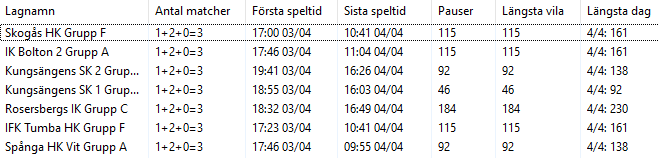
När du är färdig med ditt schema kan du öppna upp en tabell för allt från enskilda grupper till alla lag i turneringen för att snabbt få en översikt över viktiga nyckeltal. Det låetr dig kontrollera att alla har ungeför lika många långa dagar, pauser eller spelar rätt mängd matcher de olika speldagarna om din turnering går över flera dagar.
Om du till exempel bara vill publicera spelschemat för en enskild klass eller kanske första dagen av turneringen styr du det enkelt i Cup Manager. Det låter dig publicera den första matchen för alla deltagande lag, utan att hela spelschemat behöver vara helt klart.
Läs mer om hur publicering av lottning och spelschema fungerar i den här manualen.